

Nothing goes missing on the day it arrives. It goes missing four weeks later, in a folder named after a word you have stopped using, on a machine you are not sitting at.
01Work scatters unless you give it somewhere to go
A project does not arrive in one piece. The brief lands in your email. The site photographs are on your phone. The survey drawing comes off a university printer as a PDF in Downloads. A model gets photographed on somebody else’s camera and reaches you in a WhatsApp thread. Sketches are scanned in the library and land wherever the scanner puts things. None of that is careless. It is what a term looks like.
The cost is deferred, which is why it never feels urgent. In week two everything is findable, because you saved it an hour ago. In week eleven you want one photograph — the corner of the site with the retaining wall in it, from the first visit — and you cannot remember whether it is on the phone, in Downloads, in the WhatsApp thread, or on the studio drive you can only reach from campus.
Several folders is the same problem with better manners. Two folders means a decision every time something arrives, and a decision made at speed is a decision made differently each time. One folder means the answer to “where does this go” is never a question, and searching means looking in one window.
02The structure, and why it is numbered
The portfolio folder is the one that matters. The other eight exist to feed it, and the reason you make all nine on day one is that nothing reaches 07_portfolio unless it had somewhere to be in the meantime. Make these nine on the day the brief is issued. 00_admin holds the brief, the assessment criteria and your list of dates. 01_site holds photographs, video and any survey information. 02_research holds precedents, and every precedent goes in with its source written down beside it. 03_sketches holds scans of the sketchbook. 04_models holds photographs of models, taken the day you finish them. 05_drawings holds the working files — CAD, Rhino, whatever you are drawing in. 06_exports holds the PDFs and JPEGs those files produce. 07_portfolio holds the document itself. 99_archive holds everything you have stopped using.
Two digits, an underscore, no spaces. The digits are there so the folders hold this order in every window you open, and so 99_archive stays at the bottom once you have a folder numbered 10. Underscores instead of spaces because a name with spaces in it breaks the moment it becomes part of a file path.
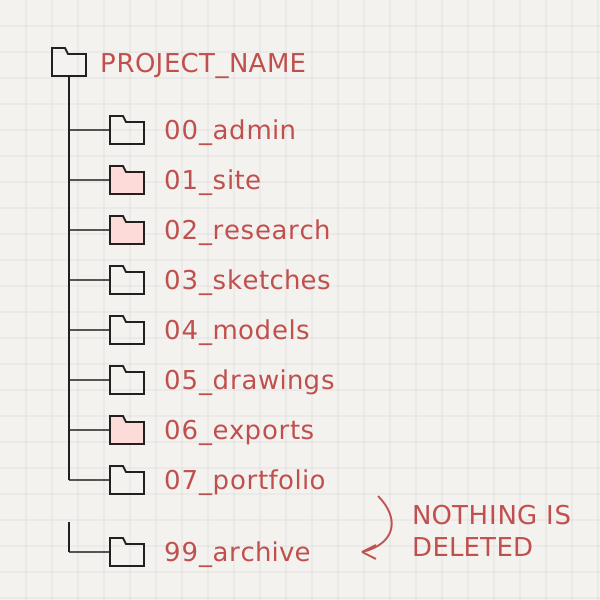
The two that earn their place fastest are 02_research and 06_exports. Research without sources is unusable by week nine, when a tutor asks where the drawing came from and the answer is a screenshot. Keeping exports apart from working files means the folder you send to a printer contains only things that can be printed. 07_portfolio is where the document lives, and it gets fed as you go rather than filled at the end. Move a drawing in the day you finish with it, and week eleven is laying out work you already have instead of compiling it from scratch. Keep the document there with its Links folder beside it, not on the Desktop. The InDesign portfolio template being built here expects to sit in it.
Every other habit on the project-start checklist assumes this folder exists to put things in.
03Where the folder actually lives
One canonical location. Everything else is a copy of that one, never a second original. Two originals is the worst state a project can be in, because both of them are half right and you will not find out which half until you are merging them at midnight.
| What you use | Good for | The catch |
|---|---|---|
| The university network drive | Large files, fast on campus, backed up by the university without you doing anything. | Not reachable from your flat unless you set up a VPN, and the account closes when you graduate. Work left there leaves with it. |
| The OneDrive or Google Drive your university supplies | Free, large, syncs to your laptop, already signed in. | It is a university account, not yours. It closes some months after you leave, and the notice period is set by your university rather than by Microsoft or Google. Find out yours in week one. |
| A personal cloud account | Yours. Your own Dropbox, iCloud or Google account survives graduation, a change of university and a change of laptop. | The free tier is small. One project with site photographs, a Rhino model and an InDesign document with links will go past it, and the upgrade is a monthly cost. |
| An external SSD | Fast enough to work from directly, holds a whole degree, no upload to wait for. | One object. It can be dropped, left in studio, or fail with no warning, and it gives you no notice before it does. |
The arrangement that holds for three years: the folder lives in a personal cloud account and syncs to your laptop, so the copy you work on and the copy in the cloud are the same folder. The university drive and the SSD are copies of it. That is a location, not a backup, and the difference between those two things is check 06, which is the next one to do.
04Nothing gets deleted, it gets moved
The rule is one line long. Work you have finished with goes to 99_archive. It does not go anywhere else, and it does not go to the bin.
Deleting is a decision, and it is one you make at one in the morning when you have just been told the scheme is not working. That version of you is not a good judge of what is worth keeping. Moving a file to 99_archive takes the same two seconds, costs nothing, and can be undone. The rejected options in there are also the material a process page is built from, which is check 07.
Keep 99_archive flat. No subfolders, no ordering, no tidying it later. It is a place where things go, not a place you maintain. If you ever need something out of it you will search by name, and search does not care how neat the folder is.
In practice
If you are already in week six. Do not sort it. Make the folder and the nine subfolders now, then set an hour aside and move everything you can find into it, with anything you are unsure about going straight into 99_archive. Moving is quick and deciding is slow, so do all the moving first. Naming comes later, and by then it is easier, because everything is in one window instead of five.
Make the folder before you make anything else. Nine folders, two digits each, in a location that syncs — four minutes now, and the version of you in week eleven gets to spend that hour drawing instead of searching.